 Shoupapp
Photo editor
A free online photo editor built for e-commerce teams
Design banners, social posts and listing images in your browser, with your product photos already there. Free to open and design with any account; only the AI actions inside use credits.
Why teams choose Shoupapp
Up to 1,500 photos per run
Send a whole folder at once, or let an automation run it on every upload, every day, week or month.
See bulk & automationReady-made settings
Pick plain options or a saved preset. We set the AI up behind them, so there is nothing to write.
Plans from $59 a month
One credit balance for every tool, and each tool’s price is on its page. A failed job gives its credits back.
Photo and video editors
Finish any result in the built-in editors, with your library already inside. No extra subscription.
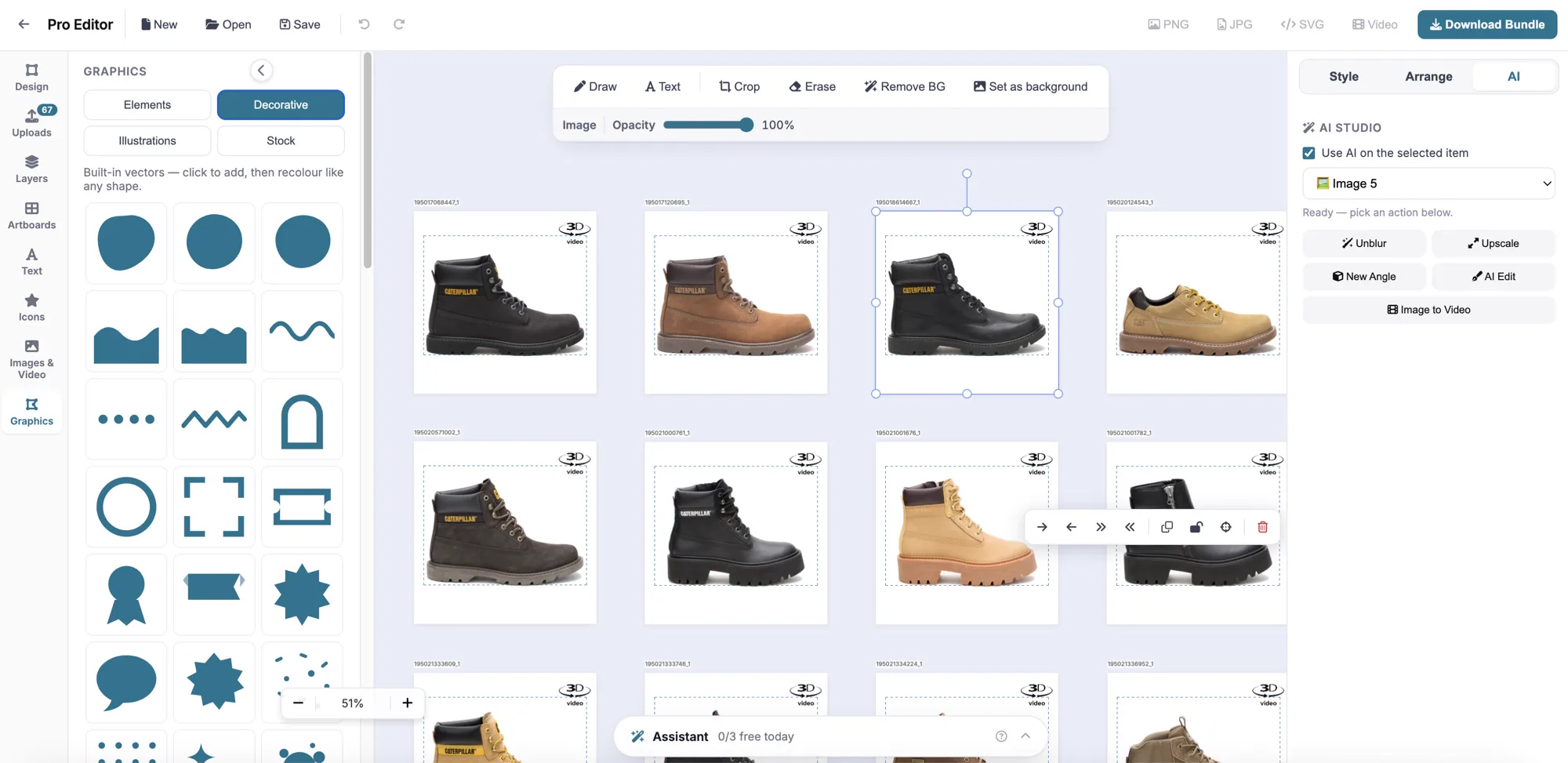
Almost every image needs a finishing touch: a line of text, a logo, a second size. The photo editor is where that happens, without another subscription. Your library is built in, so the product photos, scenes and banners you made in Shoupapp are one click away.
Work on several artboards in one project — a square post, a story and a banner for the same launch — and add text, icons, vector shapes and free stock photos. Layers, alignment and the same product shadows as the background remover are all there. Export as PNG, JPG or SVG.
On a paid plan the AI tools work right inside the canvas: remove a background, upscale or edit with a sentence without leaving your design.
What teams make with it
- Marketplace images with a badge, a size chart or a “new” label over the product photo.
- Social posts for a launch, in square, portrait and story sizes from one project.
- Web banners with your headline, price and button.
- Presentation boards for client approval, with several products on one artboard.
Because every design starts from photos that are already processed, most jobs are a matter of adding text and exporting — not rebuilding the product image from scratch.
How it works
-
Open the editor
With any account, free.
-
Drop in a product
Straight from your library, or from free stock photos.
-
Export every size
One artboard per channel, exported as PNG, JPG or SVG.
Who it’s for
Finish banners in-house
Add the price, the logo and the launch date to AI results without sending them to a designer.
Client assets in one place
Design from each client’s processed photos without downloading and re-uploading them.
Product graphics without another tool
Handle marketplace images and social posts in the same place you process the photos.
At a glance
- Canvas
- Several artboards per project, layers and alignment
- Elements
- Text, icons, vector shapes and free stock photos
- AI inside
- Background removal, upscale and AI edit (paid plans)
- Export
- PNG, JPG or SVG
- Price
- Included with every account; AI actions use credits
Credits come from your monthly plan. See what each plan includes.
Frequently asked questions
Is the photo editor free?
Opening it and designing is free with any account. The AI actions inside it use credits on a paid plan.
Do I need to install anything?
No. It runs in your browser.
Can I save my designs?
Yes. Projects are saved to your account and can be reopened later.
Can I use images I made elsewhere in Shoupapp?
Yes. Your library is built in, so every product photo, scene and banner is available in the editor.
Can I work on several sizes at once?
Yes. A project holds several artboards, so a post, a story and a banner for the same launch sit side by side.
Does it replace a full design tool?
It is built for product images: banners, posts and listing graphics made from your catalog. For those jobs it covers what most teams need, in the same place the photos are processed.
Goes well with

Banner maker

Background remover
Video editor
Send us five photos.
We will run them the way we would run your whole catalog and send back exactly what came out — before you decide anything.