 Shoupapp
Video editor
An online product video editor, right in your browser
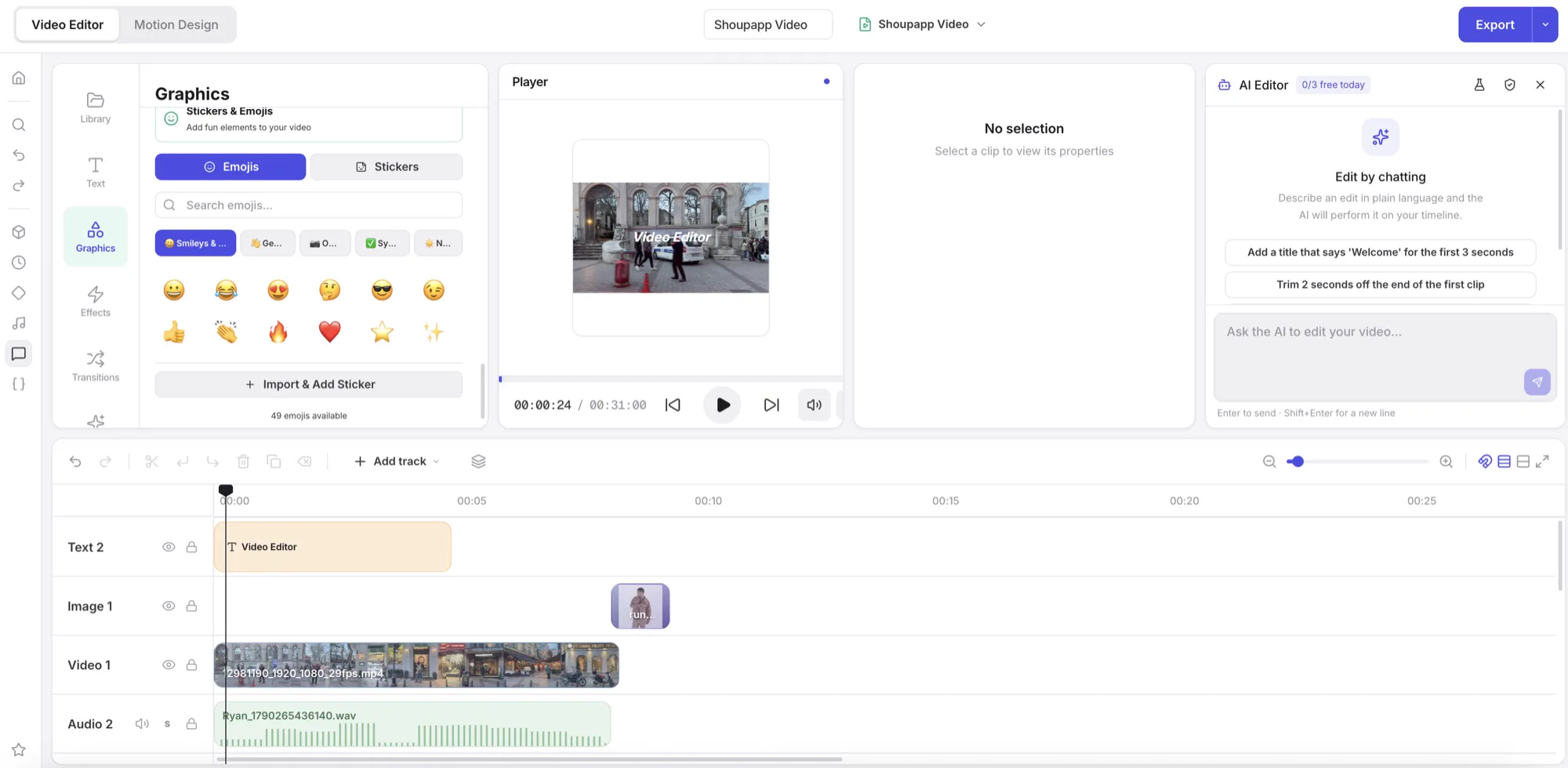
Cut, caption and finish your product videos in the browser: a multi-track timeline, captions from speech, voice-over and export, with nothing to install. Free to open, edit and export with any account.
Why teams choose Shoupapp
Up to 1,500 photos per run
Send a whole folder at once, or let an automation run it on every upload, every day, week or month.
See bulk & automationReady-made settings
Pick plain options or a saved preset. We set the AI up behind them, so there is nothing to write.
Plans from $59 a month
One credit balance for every tool, and each tool’s price is on its page. A failed job gives its credits back.
Photo and video editors
Finish any result in the built-in editors, with your library already inside. No extra subscription.
Generated clips are raw material. The video editor turns them into finished ads and posts: trim and arrange clips on a multi-track timeline, add titles, your logo and music, and animate them with keyframes. Color grading, effects and transitions are built in.
Captions can be generated from the speech in your video, and a voice-over can be made from text; on paid plans both are included at no credit cost. The video is rendered in your browser when you export.
Start from the clips you make in Shoupapp — product videos, social films, animated photos — or from your own footage.
What it is good for
- Ads: put your offer, price and logo over a product clip, in square, vertical and wide versions.
- Product explainers: combine several clips with titles and a voice-over.
- Social posts: add captions, because most short videos are watched with the sound off.
- Slideshows: turn product photos into a simple video with transitions and music.
Everything happens in one browser tab and your projects are saved to your account, so you can come back to a cut later.
From generated clip to finished ad
A typical job: make a product video or a social film in Shoupapp, open it in the editor, trim the start and the end, add your headline and price as titles, place your logo in a corner, generate captions, and export it ready to post. The clip you started from stays in your library, untouched, for the next version.
How it works
-
Open the editor
With any account, free.
-
Build the cut
Clips, titles, logo and music on a multi-track timeline.
-
Export
Rendered in your browser, ready to post.
Who it’s for
Ads without an agency
Turn product clips into finished ads with your logo, captions and offer.
Client versions in one tool
Make the square, vertical and wide versions of a client ad from the same project.
Captions and voice-over for clients
Add subtitles and a voice-over to client videos without extra software.
At a glance
- Timeline
- Multi-track, with keyframes
- Finishing
- Color grading, effects, transitions and titles
- Audio
- Captions from speech and text-to-speech voice-over (paid plans, no credits)
- Export
- Rendered in your browser
- Price
- Included with every account; AI actions use credits
Credits come from your monthly plan. See what each plan includes.
Frequently asked questions
Is the video editor free?
Opening it and editing is free with any account. AI actions inside it need a paid plan.
Do I need to install anything?
No. It runs in a modern desktop browser.
Can I add subtitles?
Yes. Captions can be generated from the speech in your video and then edited.
Does a voice-over cost credits?
No. On paid plans, text-to-speech voice-over and captions are included at no credit cost.
Can I use my own footage and music?
Yes. Import your own video, images and audio alongside the clips you made in Shoupapp.
Do exports cost credits?
No. Exporting a video is free on every account.
Goes well with

Product video

Social media videos

Photo editor
Send us five photos.
We will run them the way we would run your whole catalog and send back exactly what came out — before you decide anything.