 Shoupapp
Image to video with sound turns a still product photo into a clip that you can hear: a breath, a footstep, fabric moving, the quiet of a room. On TikTok and Reels sound is part of the format, and natural sound makes a clip feel filmed rather than assembled. We took one catalog photo of a burgundy activewear set, placed the model in a sunlit studio and made a ten second clip with natural sound only. Then we measured what you hear, second by second.


Why natural sound works on product clips
Music sets a mood. Natural sound shows that something is happening. For a product clip that difference matters:
- It feels filmed. Breathing and fabric movement are what a real camera picks up in a quiet room.
- It fits the product. Activewear is about movement and effort, and a soft exhale says more about a stretch than a beat does.
- It leaves room. A clip without music is easy to reuse with a trending sound or a voice-over later.
The sound map of this clip
The picture is one continuous take with no cut. The sound follows it: near silence while she stands, a rise during the stretch and a clear exhale when she comes back upright.
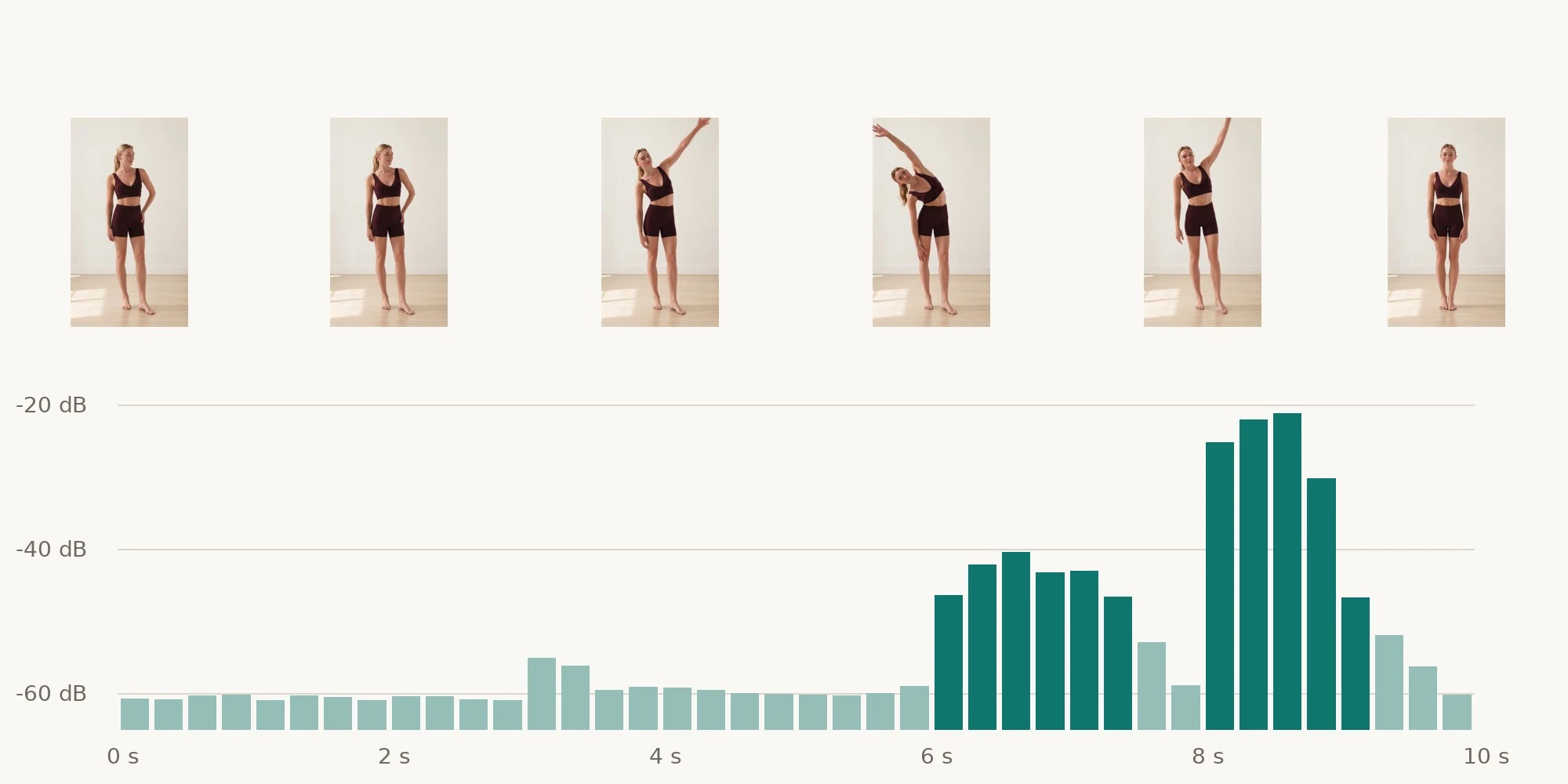
| Time | Picture | Sound | Level |
|---|---|---|---|
| 0 to 3 s | She stands with one hand on her hip | Quiet room tone | about -60 dB |
| 3 to 6 s | She lifts her arm overhead | Room tone, a faint shift | -55 to -60 dB |
| 6 to 7.5 s | She holds the side stretch | Breathing and fabric movement | about -40 dB |
| 8 to 9 s | She comes back upright | A clear, soft exhale | about -21 dB |
| 9 to 10 s | She settles, hands at her sides | Room tone returns | -50 to -60 dB |
We read the levels from the clip's own audio track in quarter-second windows, in decibels relative to full scale. The loudest moment is the exhale, about 40 dB above the room tone, which is why it stands out even on a phone speaker.
How to ask for natural sound
- In the product video tool, tick Include audio.
- Describe the sounds in the prompt, the same way you describe the movement.
- Say what should not be there: no music, no speech.
- Keep the sounds tied to the action, so a breath comes with the stretch and a step comes with the walk.
A prompt with no sound in it comes back near silent, so the description is what makes the audio. On the social video page, the sound option No music, room tone only does the same job. The clip above was asked for with this sentence:
Only quiet studio room tone, faint fabric movement and natural breathing are audible, with no music or speech.
Sounds to describe by product
Choose sounds that belong to how the product is used:
| Product | Sounds to describe |
|---|---|
| Activewear | Breathing, fabric stretching, bare feet on a wood floor |
| Footwear | Steps on wood, pavement or gravel |
| Outerwear | A zip closing, rain, wind outside |
| Drinkware | A lid clicking shut, ice in a glass, pouring |
| Bags | A zip, a buckle, keys dropping inside |
| Home textiles | A quiet room, a sheet being shaken out |
Where a clip with natural sound fits
| Placement | Why it works | Tip |
|---|---|---|
| TikTok and Reels | Viewers scroll with sound on | Keep the sound close to the action |
| Product page | Video usually plays muted until tapped | The picture has to make sense without sound |
| Paid social | Natural sound feels less like an ad | Add captions for viewers with sound off |
Captions for clips like this are covered in how to add captions to product videos, and formats per platform in product videos for TikTok and Reels.
Natural sound or music?
Use natural sound when the clip shows the product in use, and music when it sells a mood. You can also have both: keep the natural sound and lay a quiet track under it in the video editor. When music is the point, see product video with music.
Make a clip with sound from your own photo
Start from one clean catalog photo. Place it in a setting with AI product photos, then turn it into a clip with sound in the product video tool. For a whole range, batch processing prepares the photos first. Your originals are never overwritten. Costs are on the pricing page and every tool is on the products page. Try it on a product that moves: see it on your catalog.
Image to video with sound questions
Can AI add natural sound to a product video?
Yes. Tick Include audio and describe the sounds, such as breathing, steps or fabric, in the prompt.
Why is my video silent?
A prompt that describes no sound comes back near silent. Add the sounds you want and say no music or speech if you want natural sound only.
Should product videos have music or natural sound?
Natural sound for showing the product in use, music for mood. Both can be layered in the video editor.