 Shoupapp
Knitwear product photography has a reputation for being difficult, and white knits are the hardest of all. The texture that makes a sweater feel warm disappears under flat light, cream turns gray or blue on screen, and a logo knitted or embossed in the same color as the yarn can vanish completely. This guide covers how to shoot knitwear so the photo holds up, and shows what one catalog photo of a cream beanie and a cable-knit sweater became: a clean cutout, a winter scene for social media and a short vertical video.
Why knitwear is hard to photograph
Four things go wrong more often with knits than with any other product:
- White drifts. Cream, ivory and white pick up the color of the room and the light, so the same yarn looks different from one photo to the next.
- Texture flattens. Light straight from the front fills every stitch, and cables or ribbing turn into a smooth surface.
- Edges are soft. Fluffy yarn has no hard outline, which makes a clean cutout harder than with a shoe or a bottle.
- Tone-on-tone logos fade. An embossed or knitted logo in the same color as the yarn is only visible through its shadows.
How to shoot knitwear for a catalog
A routine that keeps texture, color and logos readable:
- Steam and shape the piece so ribbing and cables sit straight.
- Use soft light from one side so every stitch casts a small shadow and the texture shows.
- Expose for the white so the yarn keeps its detail instead of turning into a bright shape.
- Shoot a white card in the first frame and use it to set the same white balance on every photo.
- Try an off-white or light gray backdrop for cream knits, so the product does not melt into the background.
- Add a close-up of the stitch pattern and the logo for the product page gallery.
One knitwear photo, three formats
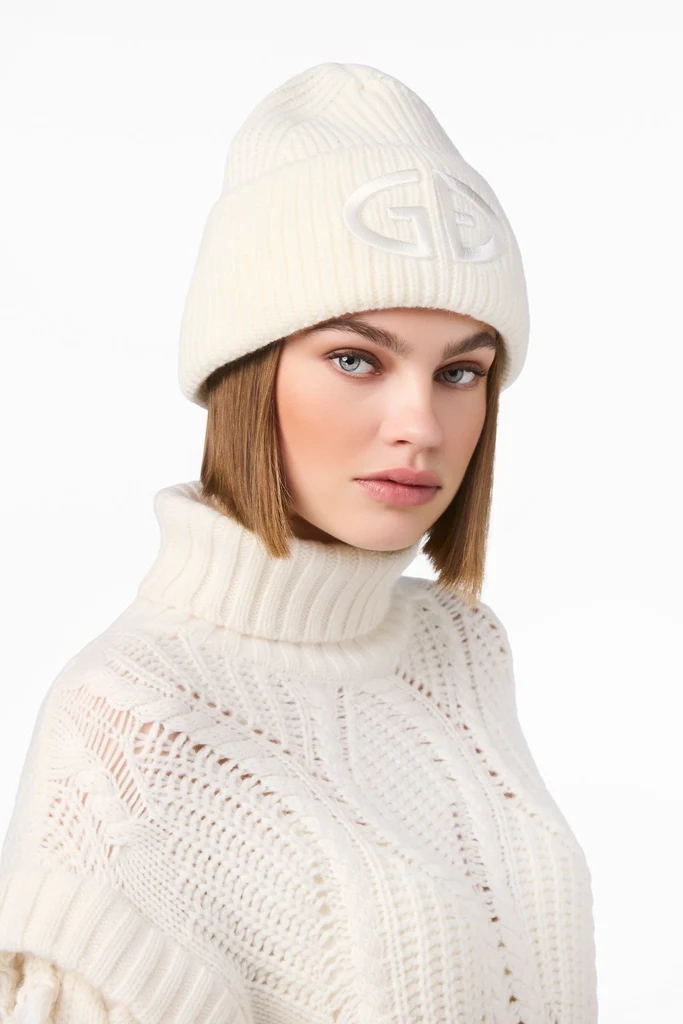
The example below started from a single catalog photo of a model in a cream beanie with an embossed logo and a white cable-knit sweater. Nothing was reshot.
1. A clean cutout
The background remover separated the model, the beanie and the sweater from the white studio background. The soft edge of the knit and the ribbed collar stay intact, so the cutout can sit on any background, from a marketplace white to a brand color.

2. A winter scene for social media
With social media images the same photo became a vertical 9:16 scene: a wooden chalet and snowy pines. The cable pattern, the ribbed cuff and the embossed logo on the beanie carry over from the catalog photo, and the warm light of the scene suits the product.

3. A short vertical video
Finally, image to video turned the scene into a five-second vertical clip with sound. The model moves a little, the snow scene stays calm, and the knit holds its pattern from the first frame to the last.
Which knitwear format goes where
Each format does a different job:
| Format | Best for |
|---|---|
| Cutout on white or a brand color | Main listing image, marketplaces, category grids |
| Vertical winter scene | Stories, social posts, seasonal campaigns |
| Short vertical video | Reels, TikTok, product page video slot |
What to check on knit detail
Before you publish, put each result next to the original photo and look at four things:
- The stitch pattern. Cables, ribbing and knots follow the real piece.
- The logo. A tone-on-tone logo is still readable.
- The white. Cream still looks like cream, not gray or yellow.
- The edges. The soft outline of the yarn looks natural on the new background.
Start with one knitwear photo
Start with one knitwear photo and run it through the background remover, then put it into a scene. For winter collections, see our guide to ski wear product photos, and for planning the rest of the year, seasonal product photos. When a whole collection is ready, automation can do the same for every new photo.
Knitwear photo questions
Should knitwear be shot on white?
For the main listing image, usually yes, and many marketplaces require it. For cream or white knits, a light gray backdrop during the shoot gives better contrast; the background can be replaced later.
Does the cutout keep the soft knit edge?
It should. Fluffy yarn is harder than a hard-edged product, so look at the outline on a dark background before you publish.
Does the scene keep the knit pattern and the logo?
In this example the cables, ribbing and embossed logo carried over. Compare every result with your original photo before you use it.
Can I do a whole knitwear collection at once?
Yes. Cutouts and scenes run on as many photos as you select, and automation can repeat the same steps for every new upload.