 Shoupapp
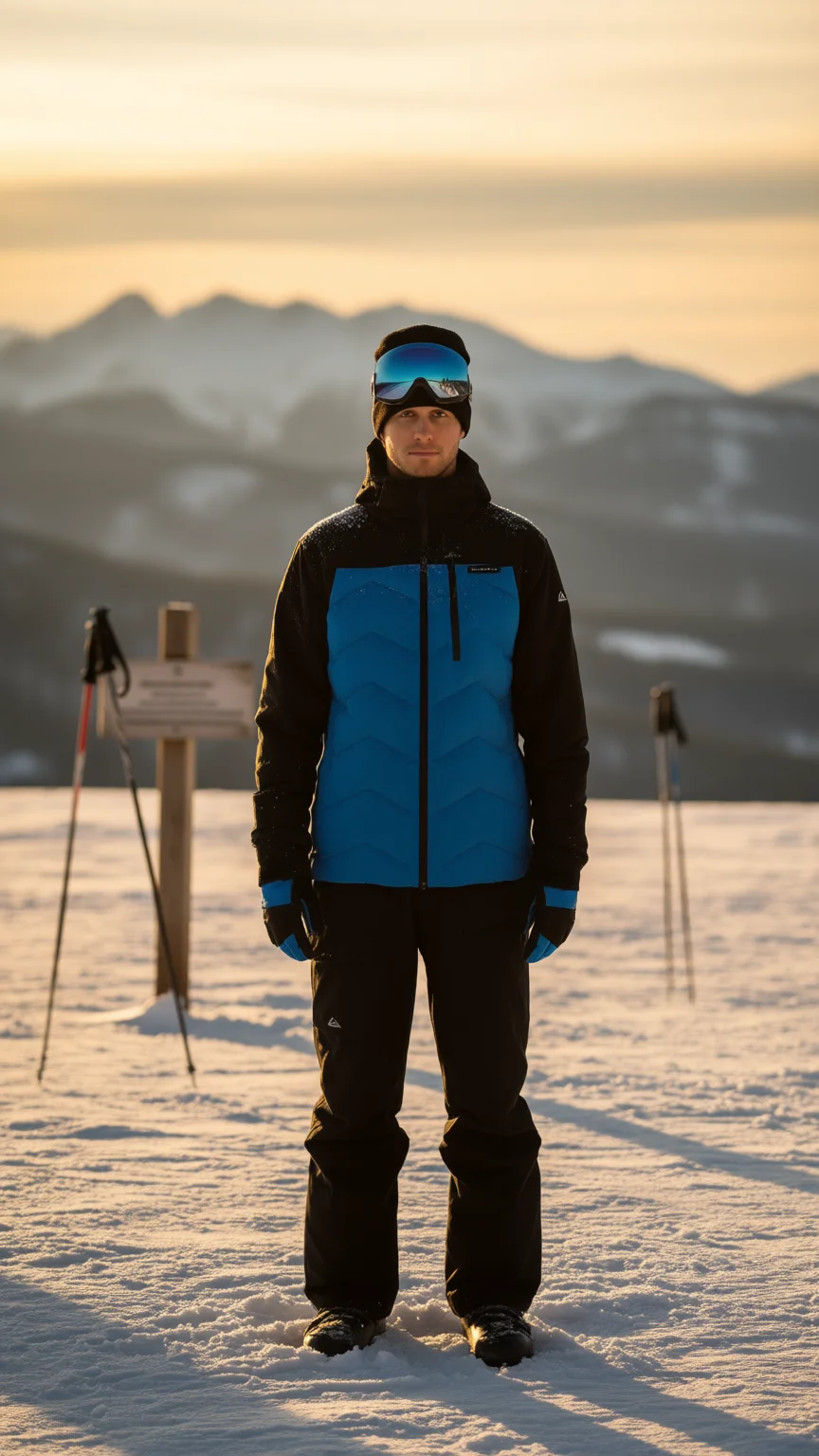
A social media product image made from scratch starts with a plain catalog photo and ends with a vertical scene you can post today. There is no photoshoot, no video and no prompt to write. This article walks through one result: a man in a quilted ski jacket on a plain background became a golden hour mountain scene in the 9:16 format that TikTok, Instagram Stories and Reels all use.


What a social image needs that a catalog photo does not
A catalog photo is made for a product page: white ground, product centered, nothing else. A feed post has a different job. It has to stop a thumb, and it has to show where the product is used. That comes down to four things:
- A vertical frame. 9:16 fills the screen on TikTok, Reels and Stories. A square catalog photo leaves empty bars above and below.
- A setting with a story. A ski jacket on white is a spec sheet. On a slope at golden hour it is a weekend away.
- Room for the app. Captions, buttons and profile names sit on top of the image, so the product belongs in the middle of the frame.
- A product that still reads small. Most people see the post at phone size, so the product has to be the clearest thing in it.
What the generated scene got right
The scene was made with an AI social media image maker from a preset, with nothing typed. Looking at it the way a photographer would:
- The product is still the product. The blue chevron quilting, the black sleeves and the small chest logo match the catalog photo.
- The light agrees with itself. A low sun behind him warms the sky, and the long blue shadows across the snow fall the way that light would throw them.
- The props explain the use. Goggles pushed up on the beanie, ski poles in a drift and a trail marker in soft focus tell a skier's story without a caption.
- The background stays quiet. Blurred peaks keep the eye on the jacket instead of competing with it.
What to check before you post
A generated scene is a finished image, but it deserves a proper look first. Check the gloves and hands, because small parts are where generated images slip. Check that the logo is not distorted. Check the color too: the jacket reads slightly warmer under the golden light than it does on white, which is correct for the scene and the reason the catalog photo stays the main image on the product page.
The sign behind him carries lines of text that cannot be read. Nothing in the post depends on it, but never use generated signs as a message.
Keep the cut-out too
The same job also produced a clean cut-out on a transparent background. Use it for marketplace listings, ads and banners, or place it on any background you like. The bulk background remover makes cut-outs for a whole catalog in one run.

How to make a social media image from your own photo
- Pick the sharpest catalog photo you have, with the whole product visible.
- Choose a social image preset and the 9:16 format. The presets are written in plain language, so there is nothing to prompt.
- Review the result against the original: product details, logo, color and anything that was added.
- Post it as a Story, a Reel cover or a TikTok photo post. An AI social media video maker is there if you later want motion as well.
- Repeat across the catalog. Automation can run the same preset on every new upload and email you when it is done.
Originals are never overwritten, the photo editor is included for text and touch-ups, and costs are shown on the pricing page. Every tool is on the products page. The best test is your own plain photos: see it on your catalog.
Social media product image questions
Do I need to write a prompt?
No. You choose a preset and a format. The wording is handled behind it.
Does it change my product?
The photographed product stays very close to the original. Anything that was not in the photo, such as the background and props, is generated and should be reviewed.
Can I use the image on TikTok if it is not a video?
Yes. A vertical image works as a photo post, a Story or a Reel cover. If you want a clip as well, see how to make product videos for TikTok and Reels.