 Shoupapp
360 shoe photography lets a shopper see a shoe from every side, the way they would turn it over in a store. The usual way to make it is a motorized turntable, a fixed camera and dozens of photos per shoe. We tried a different route: four ordinary photos of a tan lace-up boot, taken from the front, the right, the back and the left, turned into one full spin. This article shows the input, the result and the measurements, then what to check before you use a spin like this on a product page.
Why shoes are the product that needs a spin most
A shoe has no single best side. The toe shape is at the front, the profile is on the side, the heel counter and pull tab are at the back, and the lacing sits on top. A shopper comparing two pairs wants all of that, and four separate images make them work for it. A spin shows how the sides connect: how the toe box curves into the side panel and how high the collar sits at the back.
The test: four photos, no turntable
These are the four photos we started with. They are plain catalog shots on white, and they are small: three are 640 pixels square and one is 800.
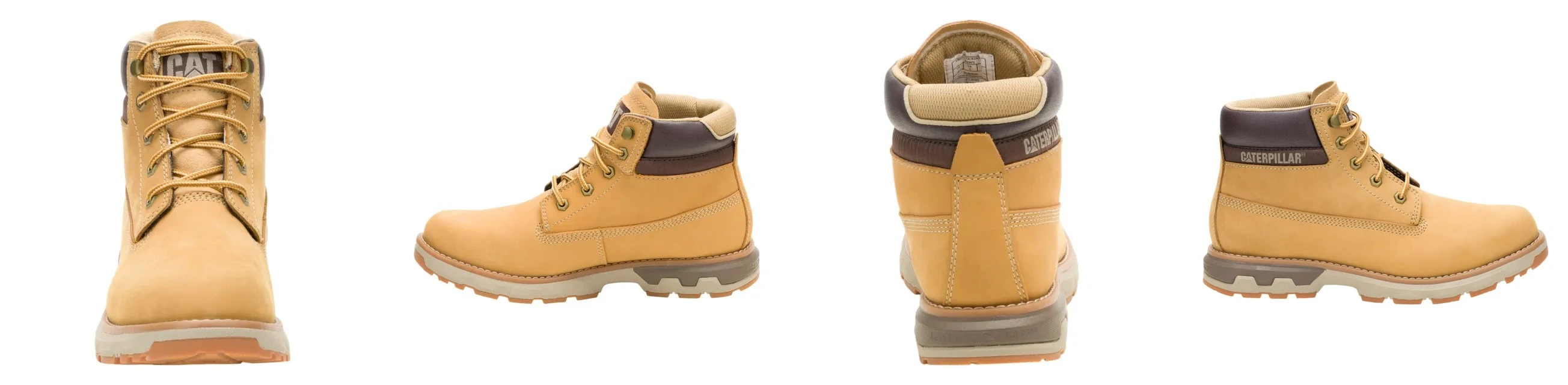
| Input | Result | |
|---|---|---|
| Photos | 4 (front, right, back, left) | A full 360 degree turn |
| Size | 640 to 800 pixels square | 896 by 1,600 pixels, vertical |
| Length | 15 seconds | |
| Background | White | Clean white through the whole turn |
The spin was made with the 360 product spin tool. You choose the four views, and the tool fills in every angle between them.
What the spin looks like
Here are eight frames from the turn, evenly spaced. Four of them are angles that were photographed. The other four are three-quarter views that nobody shot.

We checked four things.
- Size. The boot is between 488 and 498 pixels tall in every frame we sampled. It does not grow or shrink as it turns, which is the flaw that makes a spin look cheap.
- The angles in between. The generated three-quarter views match the photographed ones in color, stitching and sole shape.
- Lettering. The text on the heel and the tongue stays readable through the turn. That is not a given: in an earlier test, lettering on a rotating product broke apart.
- Background. The white stays pure white, with no flicker or gray patches.


Checked before it is delivered
A spin is only useful if it really is one continuous turn of the real product. So the finished video is checked before you get it: frames are sampled across the turn and compared with your photos, to confirm that the turn is complete and that logos and lettering match the originals. If that cannot be confirmed, the result is rejected instead of delivered, and failed jobs refund themselves.
What to watch
- Framing. In this vertical video the boot fills about 31 percent of the frame height, with white space above and below. That suits a story with a headline over it. For a product page, crop closer in the included video editor.
- It is a video, not a drag viewer. The spin plays on its own. It works in any gallery, feed or marketplace video slot, but a shopper cannot stop it at an exact angle by dragging.
- The sole. None of the four photos shows the bottom, so the spin does not either. Keep a separate sole photo in the gallery.
- Source size. These photos were small and still worked. Larger, sharper photos give the spin more detail to keep.
How to shoot the four photos for a shoe
- Use one shoe, the same one for all four photos.
- Keep the camera at the same height and the same distance each time.
- Turn the shoe a quarter turn between photos: front, right, back, left.
- Use the same plain background and the same light for all four.
- Tidy the laces and straps before the first photo and do not touch them again.
If your photos have mixed backgrounds, run them through a bulk background remover first. The longer guide to shooting and formats is how to make a 360 product spin from photos, and shadows for single shoe images are covered in which shadow suits each shoe angle.
Where to use a shoe spin
- Product page: as the second item in the gallery, after the main side view.
- Stories and short video feeds: the vertical format is already right.
- Ads: a turning product holds the eye without any editing.
- Marketplaces: in the video slot, where one is offered.
For moving scenes instead of a turn on white, see the AI product video maker. Originals are never overwritten, costs are on the pricing page and every tool is on the products page. The best test is four photos of one of your own shoes: see it on your catalog.
360 shoe questions
How many photos do I need for a 360 view of a shoe?
Four: front, right, back and left. The angles between them are filled in.
Do I need a turntable?
No. Turn the shoe by hand a quarter turn between photos and keep the camera still.
Will logos and text survive the turn?
In this test they did, and the result is checked for that before delivery. Still compare the finished spin with your photos.